
Media Tab
Available from v1.5.2+
The media tab is a quick and accessible panel for showing a media overlay on top of the floor plans. This can be used for a welcome footage or a launching logo.
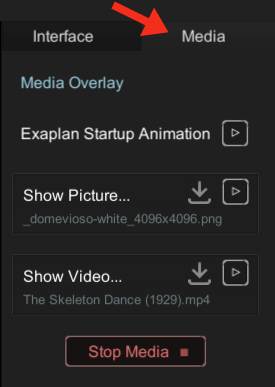
| Function | Description | Parameters |
|---|---|---|
| Exaplan Startup Animation | Plays the default Exaplan 10s animation once. | - |
| Show Picture | Loads an image file, click play to show it. | “PNG”, “JPG”, “JPEG”, “BMP” |
| Show Video | Loads a video file, click play to show it. | “MP4”, “MOV”, “AVI”, “MKV” |
The media file paths are saved in the application settings, and therefore persistent after restart for quick access. The data is saved in the file \Exaplan_Data\StreamingAssets\media_config.exaplan
{ "defaultPicturePath": "C:\\Users\\VIOSO\\Pictures\\_domevioso-white_4096x4096.png", "defaultVideoPath": "C:\\Users\\VIOSO\\Videos\\The Skeleton Dance (1929).mp4"}